
2 posts tagged with "schematics"

View All Tags

The first PCB designed with circuitscript

· 2 min read

I have designed the first PCB with a schematic created using circuitscript! The main aim of this design is to create a compact USB-UART bridge using the CH340 chip. Through this design, circuitscript is tested as a tool for generating schematics, netlist and the BOM.
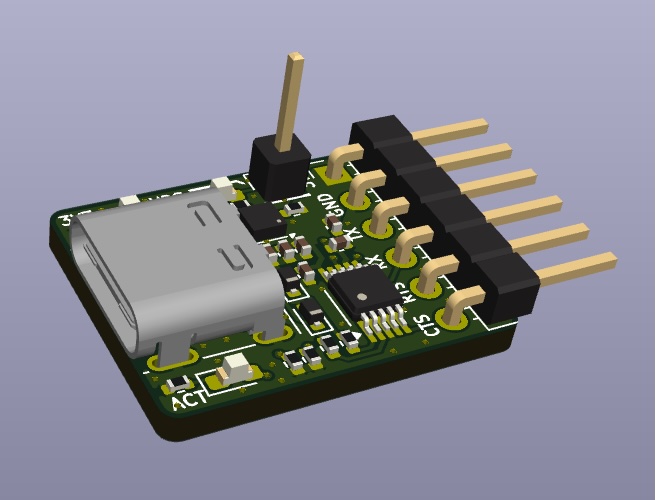
3D model of the board

Coding the schematic

The datasheet for the CH340 provides an example schematic and this was adapted for the design. Once this circuit was coded, the next thing was to decide on the connectors.

I chose USB-C as the main connector since this is quite common and the board can be used with modern devices. The UART connections are exposed with a right-angle pin-header.

Annotations

When the code is executed, circuitscript assigns reference designators automatically to the components. The -u (update source) option was used with the circuitscript tool to save the refdes comments into the source file. This ensures that the refdes are stable and do not change even if there are code changes. Read more about refdes stability here.

Parameter assignment rules for BOM

The design will be produced and assembled with JLCPCB and the parts used will be sourced from LCSC. Instead of manually assigning part numbers for each component, circuitscript provides parameter assignment rules.

The following parameter rules were used to set the LCSC_part property of the design's components.

set: "LCSC_part":
type: "res", size: "0402", value:
0: "C17168"
4.7k: "C25900"
5.1k: "C25905"
type: "cap", size: "0402", value:
100n: "C1525"
1u: "C52923"
type: "diode", color:
"RED": "C2286"

PCB layout

The circuitscript code was exported as a kicad netlist and then imported into pcbnew for the layout. The board was kept compact with small dimensions and only has 2-layers to keep costs low.
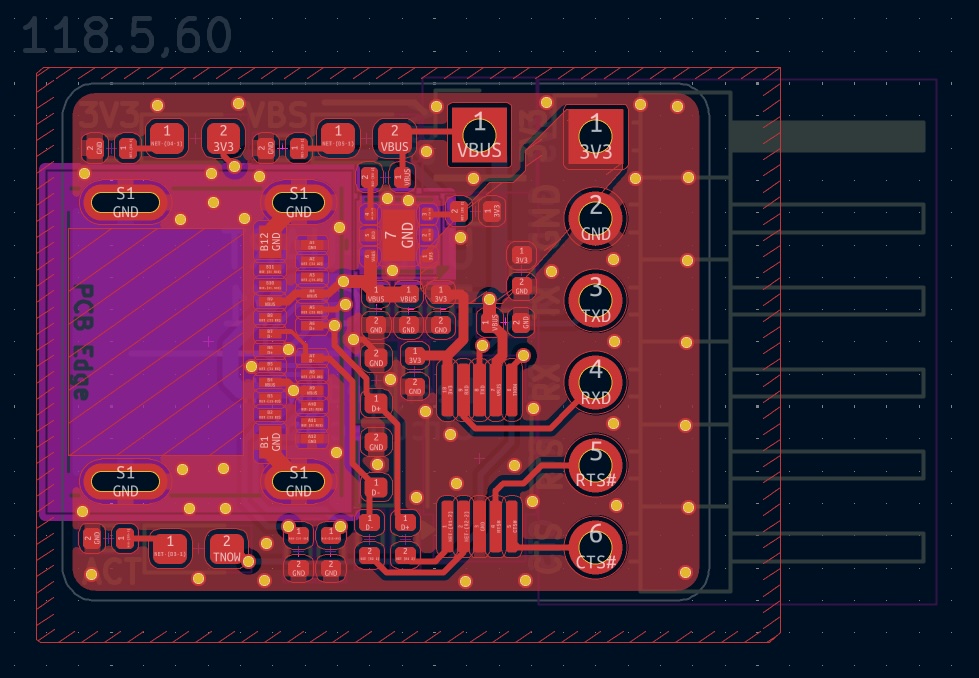
KiCAD PCB layout generated from Circuitscript

Production & Verification

Once the gerbers are checked, the design was uploaded into JLCPCB for production. Within a week, the finished and assembled boards arrived!

I tested the boards by having two boards communicate with each other and so far it does work!
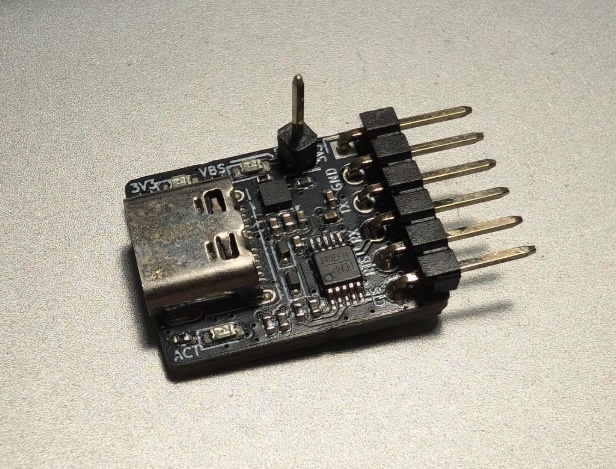
Produced PCB

The final project files can be found here https://github.com/liu3hao/usb-uart-bridge.

Introducing Circuitscript - Electronic Schematics in Code

· 2 min read

Have you ever found yourself spending more time wrestling with schematic capture GUI tools than actually thinking about your circuit design? Circuitscript offers a refreshing alternative: a code-based approach to creating electronic schematics that puts the focus back on circuit design and engineering reasoning.

Circuitscript is a specialized programming language designed specifically for describing electronic circuits. Instead of dragging and dropping components in a GUI, you write clean, readable code that describes your circuit's structure and connectivity. Think of it as "infrastructure as code" but for electronics - your schematics become version-controllable, easily shareable text files that capture both the circuit topology and the designer's intent.

The language draws inspiration from Python's readability while incorporating domain-specific concepts like execution cursors, nets, and component connectivity. Here's a simple example that creates a basic LED circuit:

from std import *

v3v3 = supply("3V3") # create 3V3 supply
gnd = dgnd() # create gnd

at v3v3
wire down 100 right 100
add res(100)
wire right 100 down 100
add led("green") pin 2

wire down 100
to gnd

This code creates a 3.3V power supply, connects it through a 100-ohm resistor to a green LED, and finally connects to ground. The at, wire, add, and to commands provide intuitive ways to describe component placement and connectivity without managing complex node numbers or netlists.

Circuitscript addresses several pain points that electronic engineers face with traditional schematic capture tools. Version control becomes trivial since schematics are just text files. Code reuse is encouraged through functions and modules. Most importantly, engineers can spend more time thinking about circuit behavior rather than fighting with GUI tools. The language generates clean SVG schematics suitable for documentation and can export to formats like KiCAD for PCB layout.

Ready to try Circuitscript? You can experiment immediately in the online Bench editor, or install the CLI tool via npm with npm install -g circuitscript. The project is MIT licensed and completely open-source, ensuring it will always remain free for engineers and hobbyists. While Circuitscript isn't intended to replace traditional schematic capture tools entirely, it offers a powerful alternative for those who prefer code-based workflows and want to bring modern software development practices to electronics design.